
Pipelines, notebooks and analysis
Renart vs Hex
Renart connects pipelines and analysis in your own repository. Hex provides a collaborative analytical workspace for your team. Both support SQL and Python; the choice is about where the work lives and how you share it.
Scope: local, open source Renart · the hosted Hex product, with plan-dependent capabilities identified
Features at a glance.
The main focus, and where each part of the workflow lives.
- Included
- Paid offering
- Separate tool or service
- Not offered
| Feature | RenartPipelines + analysisLocal · public alpha | HexCollaborative analyticsHosted · plan-dependent |
|---|---|---|
| Local use, no account | Included: Local workspace | Not offered: Hex account required |
| Data ingestion | Included: Load + API assets | Included: Files + Python code |
| SQL + Python | Included: Pipeline assets | Included: Notebook cells |
| Editing experience | Included: Types + completion | Included: Notebook editor |
| Notebooks | Included: SQL + Python | Included: SQL + Python |
| Dashboards + apps | Included: Local dashboards | Included: Published apps |
| Scheduled runs | Included: Your Renart server | Paid offering: Paid Hex plans |
| Git versioning | Included: Live project files | Paid offering: Export on publish |
| Managed hosting | Not offered: Not offered | Included: Hosted workspace |
Each cell links to its documentation. $ marks a paid offering; ↗ marks a separate tool or service. Availability does not imply equal scope. Feature scope reviewed ; paid availability checked .
Choose Renart when…
You want to load data, build and run SQL/Python pipelines, and explore the results in notebooks and dashboards without leaving your local Git-backed project.
Choose Hex when…
The main requirement is an analytical workspace for a team: collaborating on notebooks, publishing data apps and controlling who can use them. Renart does not currently offer an equivalent hosted team service.
| Your workflow | Renart | Hex |
|---|---|---|
| Starting point | Pipeline development, data movement and analysis in a local Git-backed workspace.Renart docs | An analytical workspace for SQL and Python notebooks, exploration and data apps.Hex docs |
| Git workflow | Editing the project updates its authored files directly. Review those changes in your repository.Renart docs | Git export writes project YAML when publishing. Hex documents this export as one-way.Hex docs |
| Working from a terminal | Use the local workspace or Renart CLI with the project on your machine.Renart docs | Hex has a CLI for authenticated projects, cells, runs and workspace resources.Hex docs |
| Working with data | Loading and SQL/Python transformations are pipeline assets; notebooks explore data alongside them.Renart docs | Notebooks combine SQL, Python and other cell types, including writeback to connected data systems.Hex docs |
| Recurring work | Scheduled pipelines run from a reviewed deployment on a server you operate.Renart docs | Scheduled project runs refresh published results. Availability depends on the Hex plan.Hex docs |
| Sharing with a team | Share authored definitions through Git. The local app is not a hosted multi-user collaboration service.Renart docs | Workspace sharing and permissions support distributing projects and published apps to other people.Hex docs |
On a small screen, scroll the table to compare both products.
From a revenue question to a recurring workflow.
An analyst starts by asking how revenue changed. A data engineer then needs to inspect the source, adjust a transformation and keep the result up to date. Renart brings those parts of the work into the same project.
Use a notebook to explore the data with SQL, Python, text and charts. When a useful transformation belongs in the pipeline, promote it into an asset. Review its dependencies and results in the workspace, then build a dashboard or report beside the pipeline definitions.
The benefit is continuity between development and analysis. It matters most when the same technical person moves between understanding the data and maintaining the code that produces it.
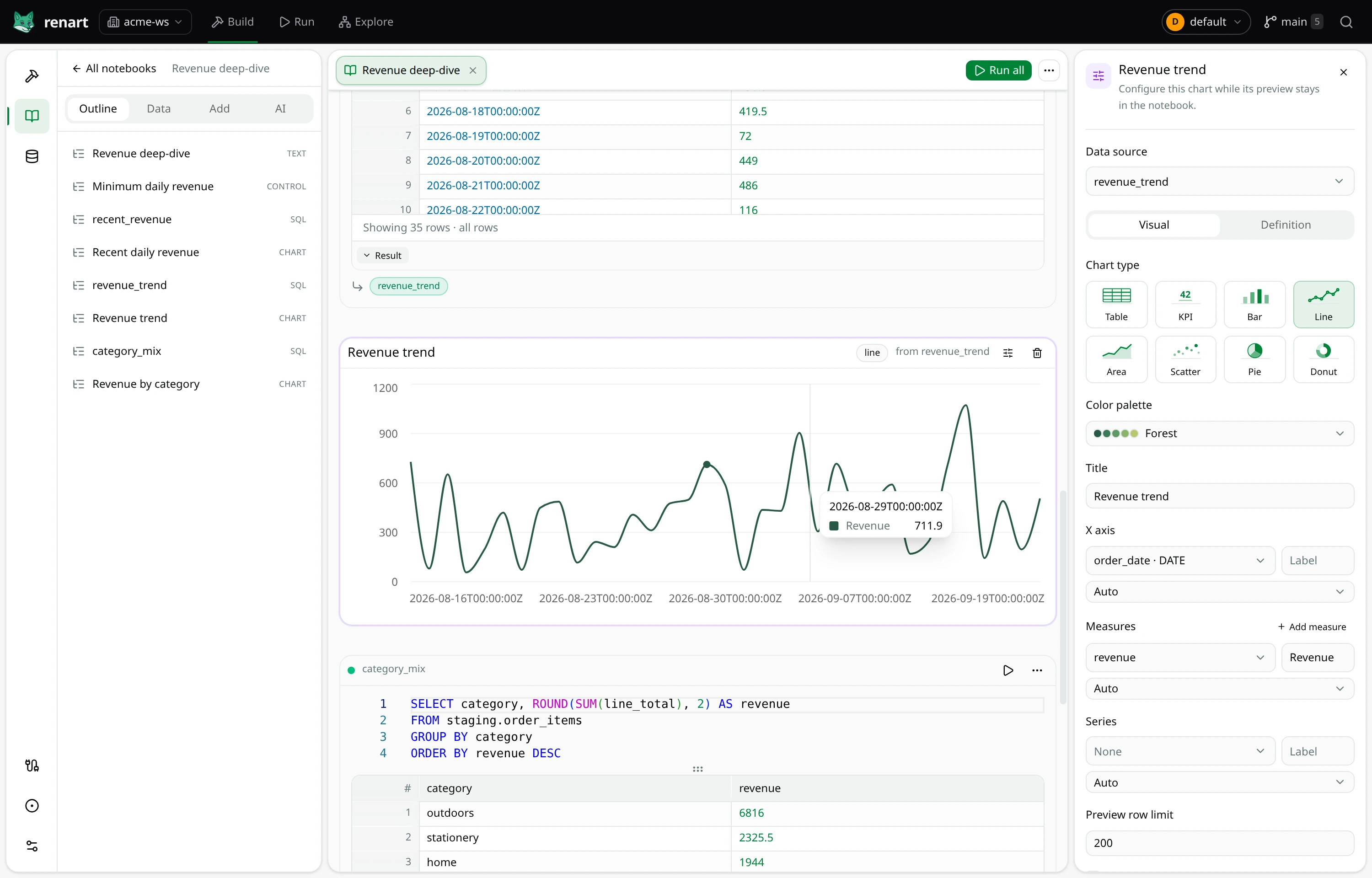
Git means different things in each workflow.
Hex supports project import and export, including its YAML representation. Its Git export can preserve published projects in a repository. It also has a CLI, so calling Hex browser-only would be inaccurate.
In Renart, the files in your repository are the definitions the local workspace edits and reads. Your normal branch, diff and review workflow applies to those files. This is a different authoring model from exporting a published analytical project; it is not a claim that Hex cannot preserve code outside its service.
Keep the sharing requirement in view.
If the result needs to reach many colleagues, evaluate Hex's sharing and permissions early. That may matter more to your team than having the pipeline and notebook in a local workspace.
Renart currently serves a local project and trusted environment. There is no built-in Hex importer or promise that its app layouts and permissions can be transferred. Existing Hex users can evaluate Renart for a separate pipeline task first, using a destination both workflows can access, before considering a wider change.
If ingestion is the decision you are making, continue with Renart vs dlt.
Try the workflow
Start with one local pipeline.
The DuckDB quickstart takes you from installation to inspected results.