
Load assets
A Load asset replicates data between two connections — from a source database, storage bucket, or file into the warehouse your pipeline runs on. It’s how raw data usually enters a pipeline: no code, just a source and a target.
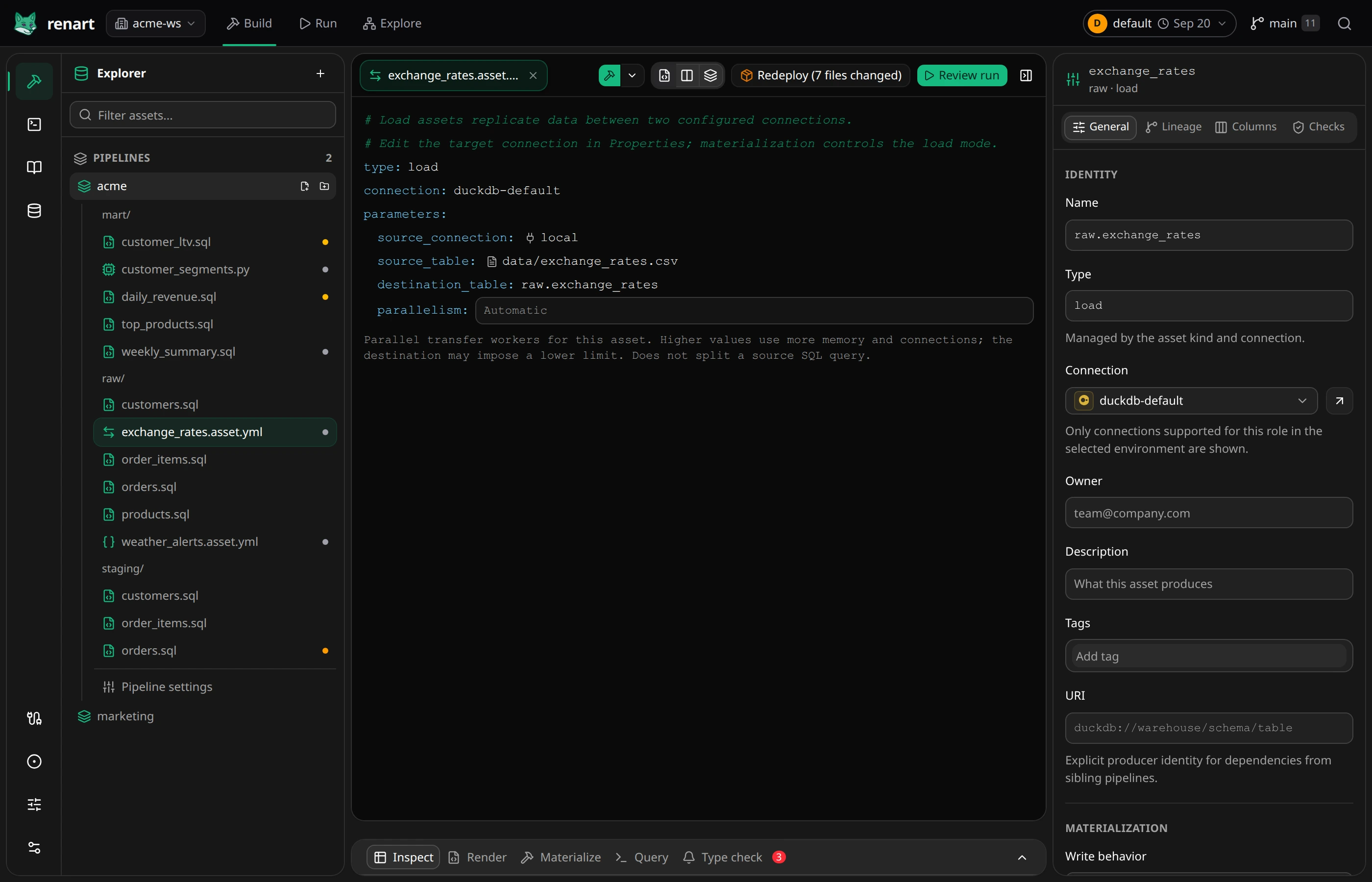
Create one
Section titled “Create one”On the canvas, add an asset and choose Load. The main pane presents inline source controls; target settings live in the properties panel:
- Source connection and source table or object — where the data comes from. The connection picker is grouped into databases, storage, and files; once a connection is chosen, Renart browses available tables or bounded S3-compatible/GCS objects while still allowing an explicit path.
- General → Connection selects the destination. For a database target,
the asset name is the target relation, such as
raw.exchange_rates. Storage and file targets use an explicit destination path. - General → Materialization controls how each run writes.
Local files are a first-class source: choose the local entry and point
the source at a file path (for example data/exchange_rates.csv) to load
a CSV that lives in your repository.
Start from the Data Browser
Section titled “Start from the Data Browser”S3-compatible and SFTP connections can be browsed by prefix or folder in Data Browser. Configure an S3 bucket first; an optional connection path acts as its browsing prefix. SFTP lists folders from the server root using the existing Sling connection, without Ingestr or a separate FTP integration.
Drag a file or prefix onto the canvas, or choose Use … in canvas on mobile or with the keyboard. The top target opens a Load source draft. Drop a writable prefix or connection after a database asset to create a Load destination draft. Review the connection, object path and write mode before saving. Cancelling does not create an asset, and saving does not transfer any data.
Storage browsing lists metadata only, up to 500 entries per folder; it does not offer SQL previews for objects. Paths containing wildcard or selector characters are not shown because Sling would treat them as patterns. A source prefix prefills a wildcard; a destination prefix suggests a Parquet filename. Review both explicitly, especially when a destination already exists.
Write behavior
Section titled “Write behavior”A Read-only connection can be the source, but not the destination. From the Data Browser, add an existing table as a Source asset, then add a Load asset downstream and select a writable connection in General → Connection. The Source stays externally managed; the Load asset owns the copied target.
Load copies data without deleting it from the source. Full refresh changes the destination only. Add downstream SQL assets on that destination connection to transform the copy.
| Choice | Each run… |
|---|---|
| Table (replace) | Loads into staging and replaces the target table. This is the atomic, schema-refreshing default where the destination supports it. |
| Table (truncate) | Keeps the existing table, empties it, then loads all source rows. Use this when views, grants, or other objects depend on the table. |
| Append rows | Adds source rows without removing existing rows. An optional update key can limit the source read. |
| Merge by key | Updates or inserts rows using the declared primary-key columns. An optional update key can limit the source read. |
On PostgreSQL, replacing a table is blocked when an existing view depends on it. Choose Table (truncate) for that shape. It preserves the relation and its dependents, but it is not an atomic swap and keeps the table’s existing schema. If the schema needs to change, update the dependent objects before using Table (replace) again.
Tune a large transfer
Section titled “Tune a large transfer”For a large transfer, open the Load asset and set Load parallelism to allow more transfer workers. Start with a small increase and compare run duration and resource use. Higher values consume more memory and connections; destinations may limit the effective parallelism. This does not split a source SQL query or change how many pipeline assets run at once. Leave it empty to keep the automatic behavior.
Columns and lineage
Section titled “Columns and lineage”The upstream dependency is inferred from the source when you save, so the Load asset takes its place on the canvas automatically. Use Sync schema to read the source’s schema into the asset’s column list — after that, downstream SQL assets get completions and type checking against the loaded table like any other upstream.
Related
Section titled “Related”- HTTP API assets — when the source is a JSON API rather than a database or file.
- Managing connections — defining the source and destination connections.