
Deployments & scheduling
One schedule exists per pipeline and environment. Renart runs it locally, and scheduled runs execute the pipeline’s deployed snapshot, not whatever happens to be in your working tree.
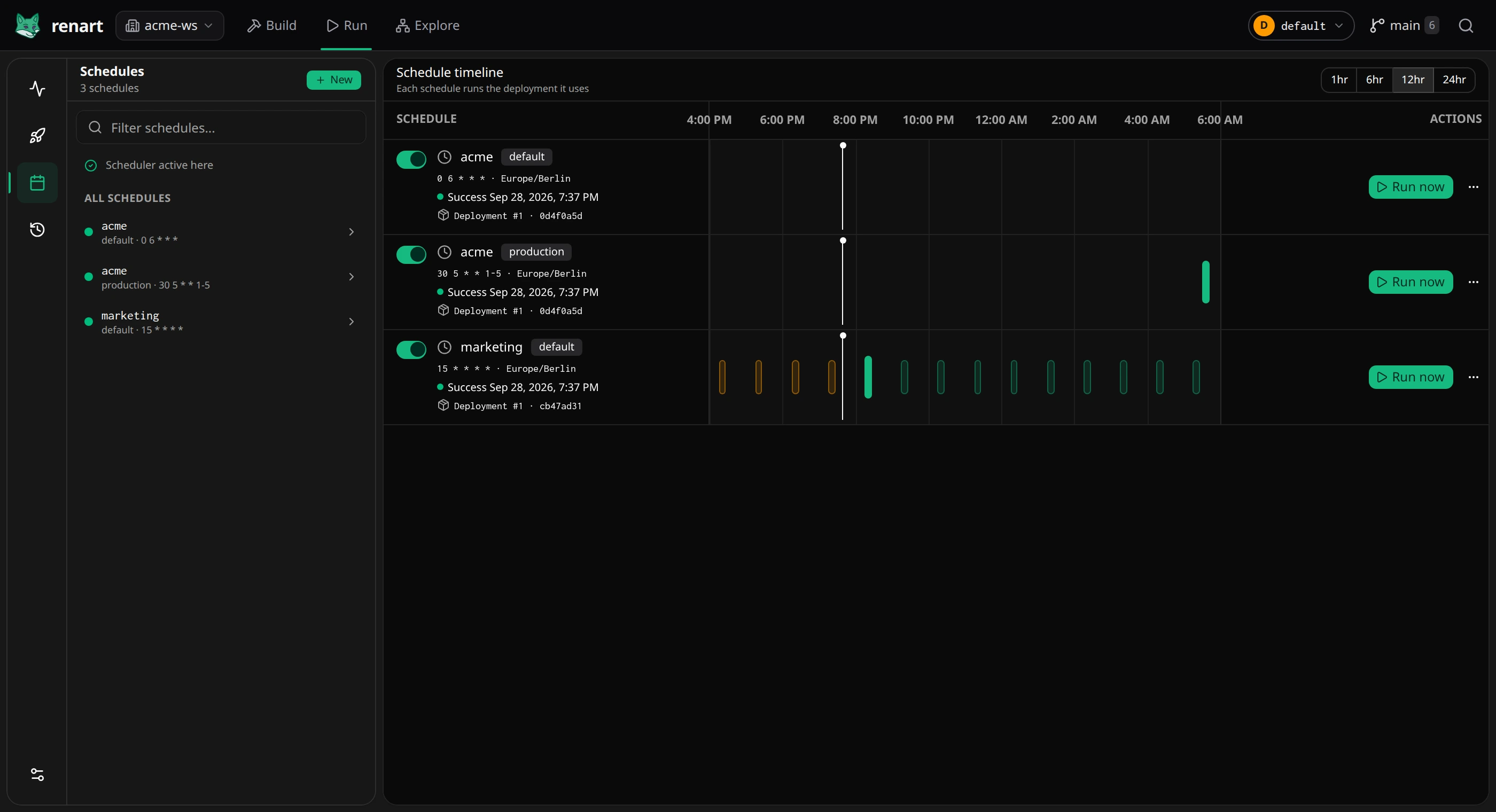
How deployments, schedules, and runs fit together
Section titled “How deployments, schedules, and runs fit together”Think of the flow as three separate decisions:
- Deploy captures the pipeline’s saved files as an immutable snapshot. Review source changes and diagnostics first; deployment does not execute the pipeline.
- Schedule defines when one environment should run and pins that environment to one deployment.
- Run is one execution of that pinned deployment for a specific time window. Its events and output appear in Runs.
| Action | Source used | What changes |
|---|---|---|
| Review run in the workspace | Current saved working tree | Starts one manual run; deployments and schedules stay as they are |
| Deploy or Redeploy | Current saved working tree | Creates a deployment and moves the schedules you check; executes no data |
| Use #N on a schedule | A newer deployment | Moves that schedule to the newer deployment |
| Run now on a schedule | That schedule’s current deployment | Starts one run; the schedule doesn’t change |
This separation lets you keep editing after a deployment without changing what your schedules run. A new deployment only reaches the schedules you check when you deploy.
Review a deployment
Section titled “Review a deployment”Click Deploy or Redeploy in the asset workspace. Changes & impact lists the files that changed since the last deployment. Expand a file to see its diff and any findings; open Why this matters only when you need the additional explanation.
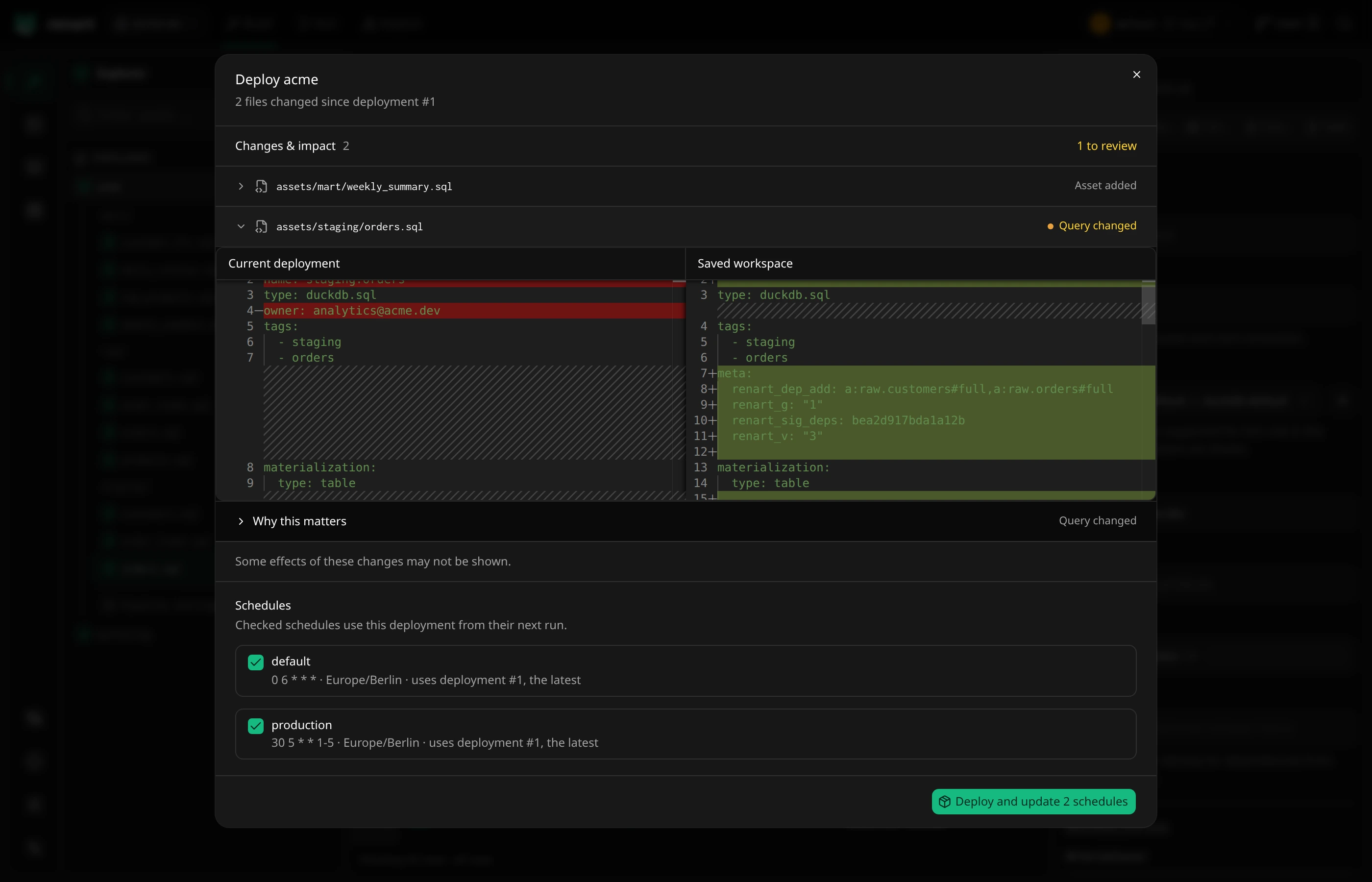
Follow links such as Open columns to fix the existing declaration in the editor. Problems that would stop the pipeline from running block the deployment until you fix them.
Schedules lists every schedule of the pipeline. Schedules that use the latest deployment, and schedules that were never deployed, are checked; a schedule you kept on an older deployment is not. Checked schedules use the new deployment from their next run. Deployment saves definitions only; it does not materialize data.
When your files haven’t changed since the latest deployment but a schedule still uses an older one, the button reads Update N schedules and moves the checked schedules without creating a new deployment.
Create a schedule
Section titled “Create a schedule”In Run → Schedules, click New schedule and pick:
- the pipeline and the environment to run against;
- a cron expression and timezone (for example
0 7 * * 1-5inEurope/Berlin); - a catch-up policy — skip missed intervals, or run once to catch up after downtime.
Creating a schedule for an environment without a deployed snapshot offers to deploy the working tree now and pin this schedule to it.
Renart writes the desired cadence and environment settings to
.renart/schedules.yml, so schedule changes are ordinary reviewable Git diffs.
The exact deployment pin and run history stay local to each machine. On a new
checkout, a declared schedule remains paused until that machine has an explicit
deployment pin.
Under Variables, each variable the pipeline declares keeps its Pipeline default unless you set a Value or an Environment variable for this schedule. Values are stored in the declaration. For a secret, choose Environment variable and enter its name; Renart resolves it from the server process only while validating, planning, or running and does not write the resolved value to schedule or run state.
Deployments keep schedules stable
Section titled “Deployments keep schedules stable”Deploying records a snapshot of the pipeline as it is; a schedule runs its
deployment until you move it to another one. You can keep editing the working
tree without changing what the schedule runs. When you’re ready, deploy and
check the schedules that should use the new deployment (or create the
deployment with renart deploy from CI and switch
schedules with Use #N).
Managing schedules
Section titled “Managing schedules”Each row in the Schedules view shows the cadence, the last success, and a timeline of recent and upcoming runs. From the row you can pause the schedule with the toggle, start a run of its deployment with Run now, and switch to a newer deployment with Use #N. Its menu edits, deploys the current files or archives it. Removing its declaration keeps local run history and the previous pin during the configured schedule-history window, so re-adding the same pipeline/environment key can restore it. Scheduled runs land in Runs & history like any other run.
Review deployments and the run timeline
Section titled “Review deployments and the run timeline”Use the Run tool rail to open Schedules, Deployments, or Runs. The scheduling area also has a Run timeline view:
- Schedules owns cadence, environment, lifecycle, and the exact pinned deployment.
- Deployments lists retained immutable snapshots, their source identity, creation time, and which schedules currently use them. Open one to compare it with the saved working tree or review a newer deployment.
- Run timeline lays recent executions out chronologically across pipelines and environments. Open a run for its per-asset timeline and output.
These are separate routes, so browser back/forward navigation and direct links preserve the selected operational view.
The scheduler is enabled by default in both desktop and browser mode. Renart
and the host machine must stay running. For an always-on machine, start
renart web --no-open; use --scheduler=false when scheduling should be disabled.
See the CLI reference.