
Pipeline development and operation
Renart vs Bruin
Choose how you want to work with your pipelines. Renart brings development, execution and analysis into a local visual workspace. Bruin offers a CLI and editor extension, with Bruin Cloud as a separate managed platform.
Scope: local, open source Renart · Bruin CLI and VS Code extension · Bruin Cloud where named
Features at a glance.
The main focus, and where each part of the workflow lives.
- Included
- Paid offering
- Separate tool or service
- Not offered
| Feature | RenartPipelines + analysisLocal · public alpha | BruinPipeline engineeringCLI + VS Code |
|---|---|---|
| Local use, no account | Included: Local workspace | Included: CLI + VS Code |
| Data ingestion | Included: Load + API assets | Included: Connector assets |
| SQL + Python | Included: Pipeline assets | Included: Pipeline assets |
| Editing experience | Included: Types + completion | Included: VS Code extension |
| Notebooks | Included: SQL + Python | Separate tool or service: External notebook tool |
| Dashboards + apps | Included: Local dashboards | Separate tool or service: Bruin Cloud |
| Scheduled runs | Included: Your Renart server | Separate tool or service: Cloud / scheduler |
| Git versioning | Included: Live project files | Included: Project files |
| Managed hosting | Not offered: Not offered | Separate tool or service: Bruin Cloud |
Each cell links to its documentation. $ marks a paid offering; ↗ marks a separate tool or service. Availability does not imply equal scope. Feature scope reviewed ; paid availability checked .
Choose Renart when…
You want the code, dependency canvas, data previews, notebooks and dashboards in one workspace, with the definitions you author kept in your repository.
Choose Bruin when…
You prefer its CLI and VS Code workflow, or want to evaluate Bruin Cloud for managed operation. A visual workspace is a workflow preference, not a prerequisite for building good pipelines.
Start with the relationship.
Renart uses open-source Bruin components for pipeline execution and works with a related pipeline model. You can inspect that relationship in Renart's dependencies. Renart's contribution is the integrated workspace and the development, execution and analysis workflows around it.
That relationship is not a guarantee that every feature or file will work interchangeably across versions. Renart-specific notebooks, presentations and schedules have their own behavior. Evaluate the actual project and tool versions before mixing workflows.
| Your workflow | Renart | Bruin |
|---|---|---|
| Authoring | A local visual workspace with code, the pipeline canvas and data previews together.Renart docs | The open-source CLI works with your editor; Bruin also offers a VS Code extension.Bruin docs |
| Pipeline scope | Load data, build SQL and Python assets, and inspect their dependencies and results.Renart docs | Ingestion, SQL and Python transformations, quality checks and lineage are part of the Bruin workflow.Bruin docs |
| Source control | Visual edits update authored files directly in your Git repository. Run history is stored separately.Renart docs | Pipelines and asset definitions are code in a project, suitable for source control and CI.Bruin docs |
| Analysis | Local notebooks, dashboards and reports sit alongside pipeline development.Renart docs | Bruin Cloud adds an analytical layer with agents and dashboards to its managed pipeline platform.Bruin docs |
| Scheduled operation | Review and deploy a snapshot to an environment. Renart runs its schedules while your server is running.Renart docs | Run the CLI on infrastructure you operate, or use Bruin Cloud for managed scheduling and monitoring.Bruin docs |
On a small screen, scroll the table to compare both products.
Follow one change through the workflow.
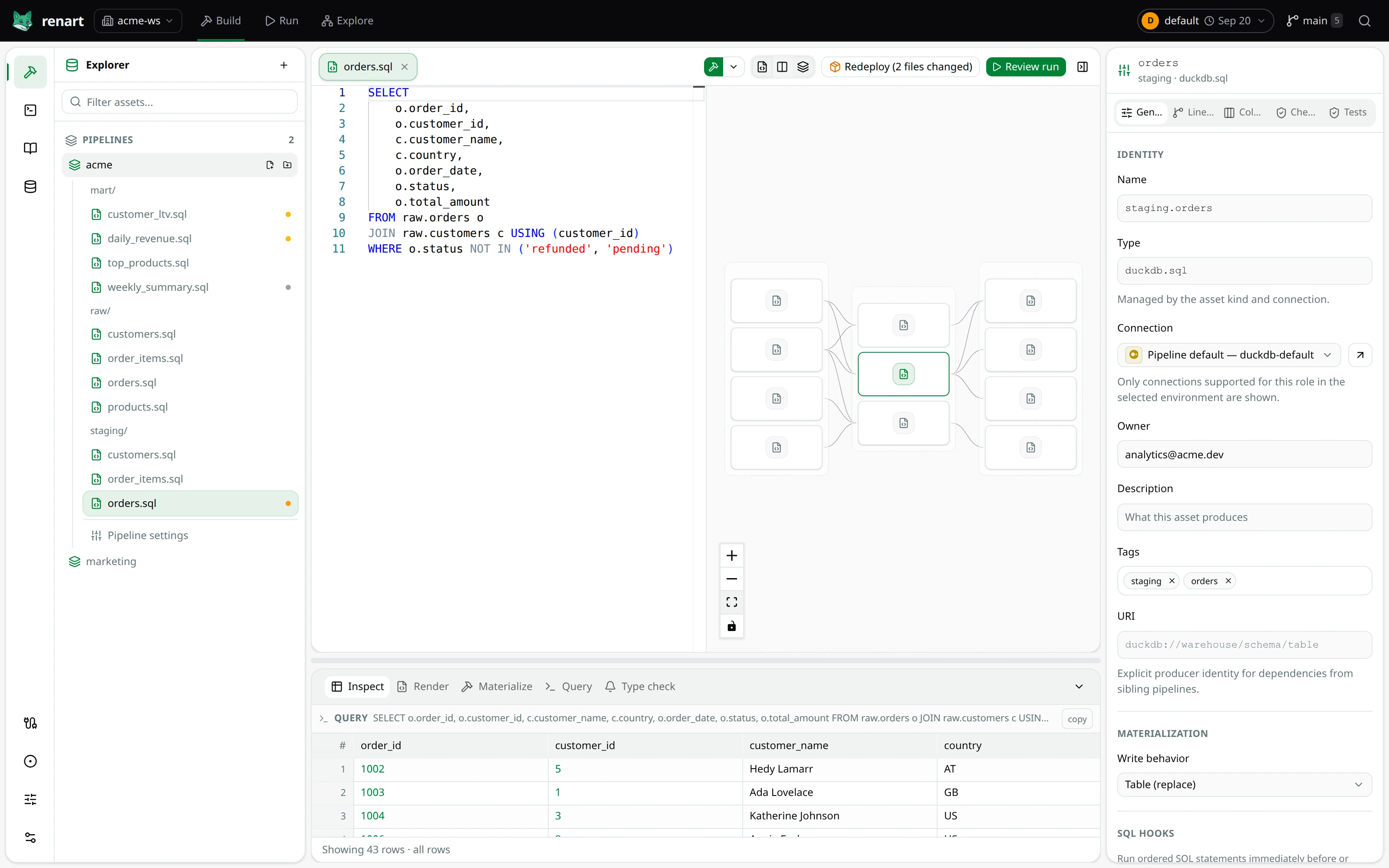
Suppose your orders model needs a new customer field. In Renart, open the asset beside its canvas, use the known schema while editing, inspect the result, and review the source change. The dependencies stay visible while you decide what to rebuild.
- Edit with context. The asset editor brings SQL and Python feedback into the pipeline workspace.
- Review the effect. Follow the dependency canvas and its staleness states. These help you reason about changed definitions; they do not guarantee that every business-logic mistake is detected.
- Choose the run. Review the materialization or deployment, then inspect its run history.
If you already do this comfortably from Bruin's CLI, your editor and existing CI, the question is whether Renart's combined view helps you maintain the project. Shared capabilities such as SQL, Python, Git and lineage are not reasons on their own to switch.
Decide who operates the runtime.
Local Renart does not require a hosted account, but you operate the server, connections and scheduled execution. Bruin's deployment guides also cover self-managed options; its Cloud offering provides managed scheduling, run monitoring and connection management.
If hosted team operation is the requirement, compare that requirement directly. Renart's current public alpha is not an equivalent managed service. If the priority is a local development experience spanning pipelines and analysis, the Renart quickstart is a practical place to evaluate it.
Also considering an analysis-first workspace? Read Renart vs Hex.
Try the workflow
Start with one local pipeline.
The DuckDB quickstart takes you from installation to inspected results.