
HTTP API assets
Use an HTTP API asset when an endpoint returns JSON records that you want as a version-controlled table in your pipeline.
Before you start
Section titled “Before you start”- Add the destination warehouse connection to the active environment.
- Keep API tokens in environment variables. Do not paste secrets into the asset — it’s committed to your repository.
Create the asset
Section titled “Create the asset”- Open Build and click New asset.
- Select HTTP API.
- Choose a starter:
- OpenAPI starter uses public weather alerts to demonstrate schema inference and response validation.
- Paginated REST demonstrates body-provided next-page URLs with a public API.
- JSON request body demonstrates a POST with nested JSON data and no credentials.
- Pipedrive Deals demonstrates API-key authentication, cursor pagination, execution-window filtering, and replay-safe merge.
- Select the destination connection and click Create asset.
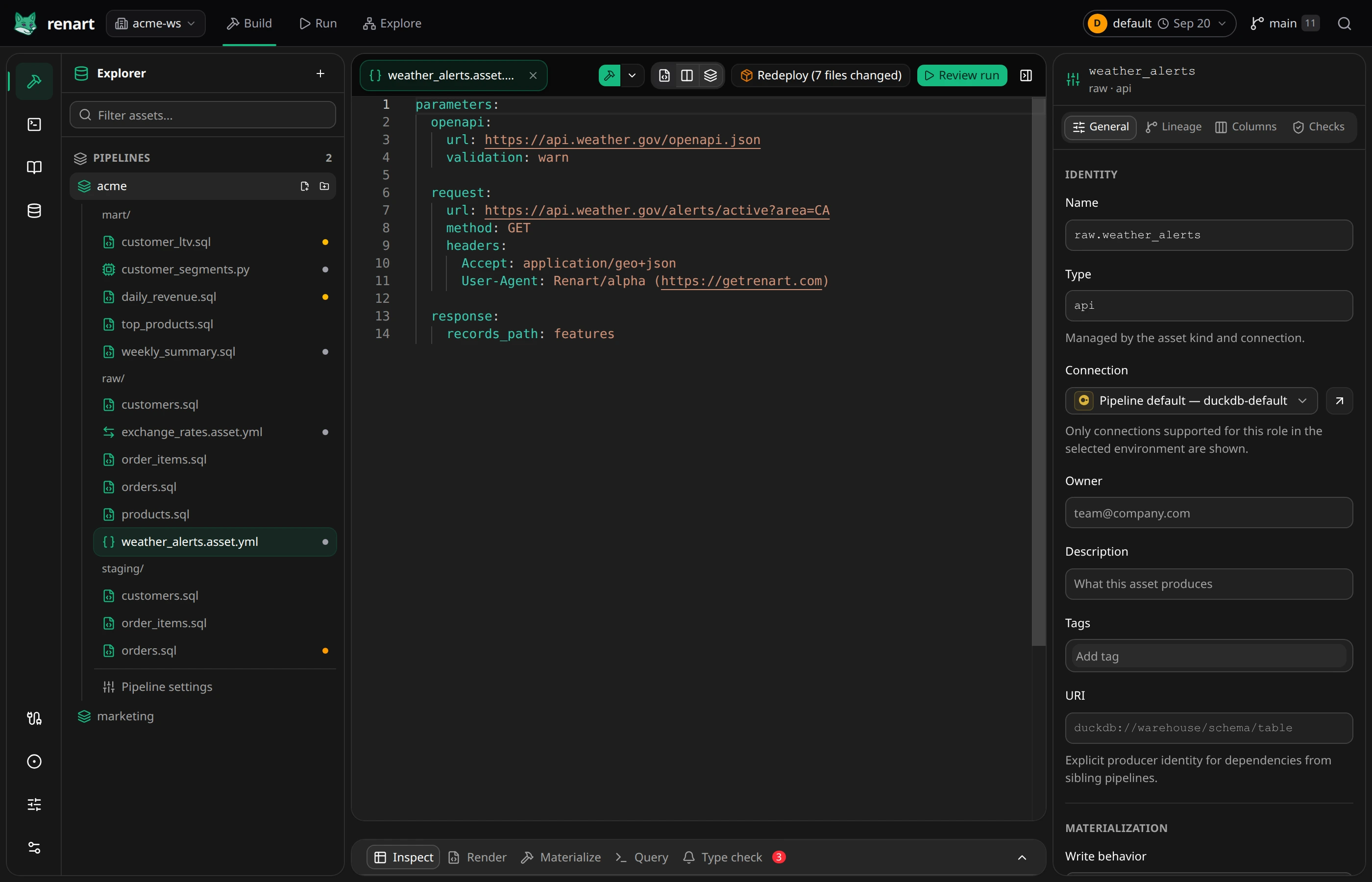
- Edit the request and response paths in the API editor. The OpenAPI starter, for example, begins with:
parameters:  openapi:    url: https://api.weather.gov/openapi.json    validation: warn
  request:    url: https://api.weather.gov/alerts/active?area=CA    method: GET    headers:      Accept: application/geo+json      User-Agent: Renart/alpha (https://getrenart.com)
  response:    records_path: features
The editor suggests request and response paths when an OpenAPI document is available. Save the asset after changing its YAML.
Test the response and add columns
Section titled “Test the response and add columns”- Open Columns in the properties panel.
- Select Live request when you want to include a sampled response as evidence, then click Sync schema. This makes a real request to the endpoint.
- Review the result. Safe additions apply directly; conflicting types or removals open a resolver so you can choose which evidence to use.
- Mark the stable identifier as a primary key before choosing Merge by key.
Do not use a state-changing endpoint merely to test inference. A sampled response may omit optional fields; keep declared columns you know are valid.
Configure pagination
Section titled “Configure pagination”Add one pagination block that matches the API:
| API pattern | pagination.type |
Key fields |
|---|---|---|
| Response contains the next URL | next_url |
next_url_path |
HTTP Link header contains the next URL |
next_url |
next_url_header |
| Response returns a cursor | cursor |
cursor_param, cursor_path |
| Request increments a page number | page_number |
page_param, start_page |
| Request increments an offset | offset |
offset_param, limit_param, limit |
Set max_pages to bound each run.
Configure a windowed load
Section titled “Configure a windowed load”When an API can filter by update time, pass the selected run window through the standard Jinja values. Use Merge by key and at least one primary-key column so rerunning or overlapping a window does not duplicate rows:
Set Merge by key in General → Materialization and mark the identifier with the key control under Columns. In the API editor, pass the window in the request parameters:
parameters: request: url: https://api.example.com/records params: updated_since: "{{ start_timestamp }}" updated_before: "{{ end_timestamp }}"The materialization time window controls these values. You can rerun the same window or select an older range for a backfill; successful windows contribute to the asset’s interval coverage. Renart does not maintain a separate source cursor, so different environments and variable-based pipeline variants do not share a mutable position. Cursor pagination still works within each run.
Choose OpenAPI validation
Section titled “Choose OpenAPI validation”| Value | Run behavior |
|---|---|
warn |
Default. Report schema mismatches and continue loading. |
error |
Stop the run when the response does not match the selected schema. |
off |
Do not fetch or validate the OpenAPI schema during the run. |
Result
Section titled “Result”The API request, schema, pagination, and materialization settings are plain YAML changes you can review and commit. Materializing the asset writes one warehouse table. Nested arrays stay as JSON values; HTTP API assets do not create child tables.
Related
Section titled “Related”- Load assets — when the source is a database, bucket, or file rather than an API.
- The asset editor — columns, materialization, and checks in the workbench.
- Managing connections