
Concepts
Renart is an open source data platform that works inside your Git repository. Its visual workspace connects data movement, transformation, execution and analysis. It separates the definitions you edit from the data and execution history they produce. These are the terms used in the UI.
Project
Section titled “Project”A project is a git repository (or a folder inside one) holding pipelines,
notebooks, dashboards, reports, and a project config file with connections and
environments. The repository is the source of truth for authored definitions.
Machine-local run, deployment, and freshness records live separately in
.renart/state.db.
Pipeline
Section titled “Pipeline”A pipeline is a folder of assets that run and get reviewed together, with a
pipeline.yml for its name and defaults. A workspace can hold several
pipelines; the project switcher and catalog span all of them. Per-environment
schedule declarations live with the project rather than inside one pipeline.
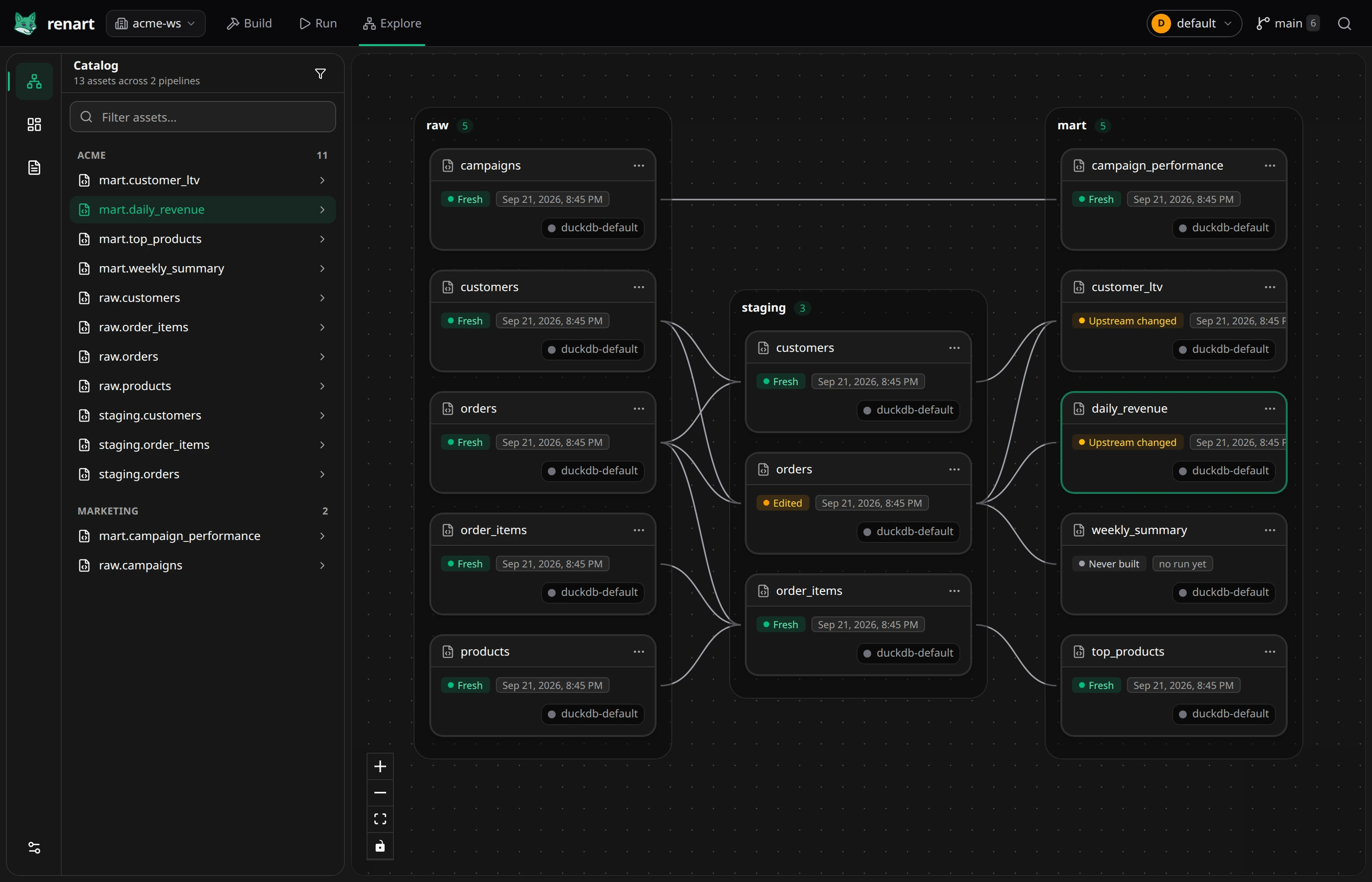
An asset is one unit of work: a SQL transformation, a Python script, a data load, an HTTP API call, or a declaration for an existing source table. On the canvas an asset is a node; in the editor it’s code or a guided form plus a workbench of its metadata. Each asset is stored as one file in your repository — see how it works.
Dependencies & lineage
Section titled “Dependencies & lineage”Renart infers dependencies from your SQL (FROM staging.orders makes
staging.orders an upstream) and draws them as edges on the canvas. The
catalog extends that lineage across every pipeline in the project. A reviewed
full dependency can link pipelines through a stable asset URL, so the consumer
waits for the exact producer deployment it was reviewed against.
Inspect vs. materialize
Section titled “Inspect vs. materialize”Inspect previews an asset without materializing its destination table. Materialize executes the asset and writes the configured output. A preview can still query a warehouse, execute Python, or make an HTTP request; it is not a sandbox for untrusted code. Review the trust boundary before running an unfamiliar project.
Staleness
Section titled “Staleness”Renart fingerprints every asset — its code, its dependencies, its outputs — and compares that against what was last materialized. The canvas shows the result on each node: Fresh, Edited (this asset changed), Upstream changed (something it reads from changed), or Never built. Review run uses this information to start with the assets that are out of date; see Rebuild only what changed. Existing source tables use External source instead: Renart does not build them or pretend to know whether their data is fresh.
Environment
Section titled “Environment”An environment is a named set of connections (for example default and
production) defined in the project config. The same pipeline can preview,
materialize, and run on a schedule against different environments.
Deployment, schedule, and run
Section titled “Deployment, schedule, and run”A deployment is an immutable, reviewed snapshot of one pipeline. A schedule chooses when an environment runs and pins it to one deployment. A run is one execution of that pinned snapshot or of the saved working tree, with durable steps, output, and timing. See Deployments and scheduling.
Notebook
Section titled “Notebook”A notebook is an ordered, version-controlled analysis document. SQL and Python cells, source imports, text, controls, and visualizations share one local DuckDB session, so data from different systems can be joined without creating remote scratch tables. When a cell earns a permanent place, promote it into a pipeline asset.
Dashboard and report
Section titled “Dashboard and report”A dashboard is a responsive grid of typed visualizations and controls. A report is an ordered document that combines prose and visualizations. Both resolve their datasets against pipeline assets or read-only connection queries, and Renart checks referenced columns and compatible types before saving or running the presentation.
Git-native
Section titled “Git-native”Every visual edit — moving a node, renaming an asset, changing a materialization — lands as a plain file change. Branch, review, and revert pipeline work like any other code.