
Variables and Jinja in SQL
SQL assets can use Jinja to insert values that change between runs, such as the start of the data window, or pipeline variables that several assets share. Renart renders the template for the selected window and environment, and completion, hovers and type checking work on the rendered SQL.
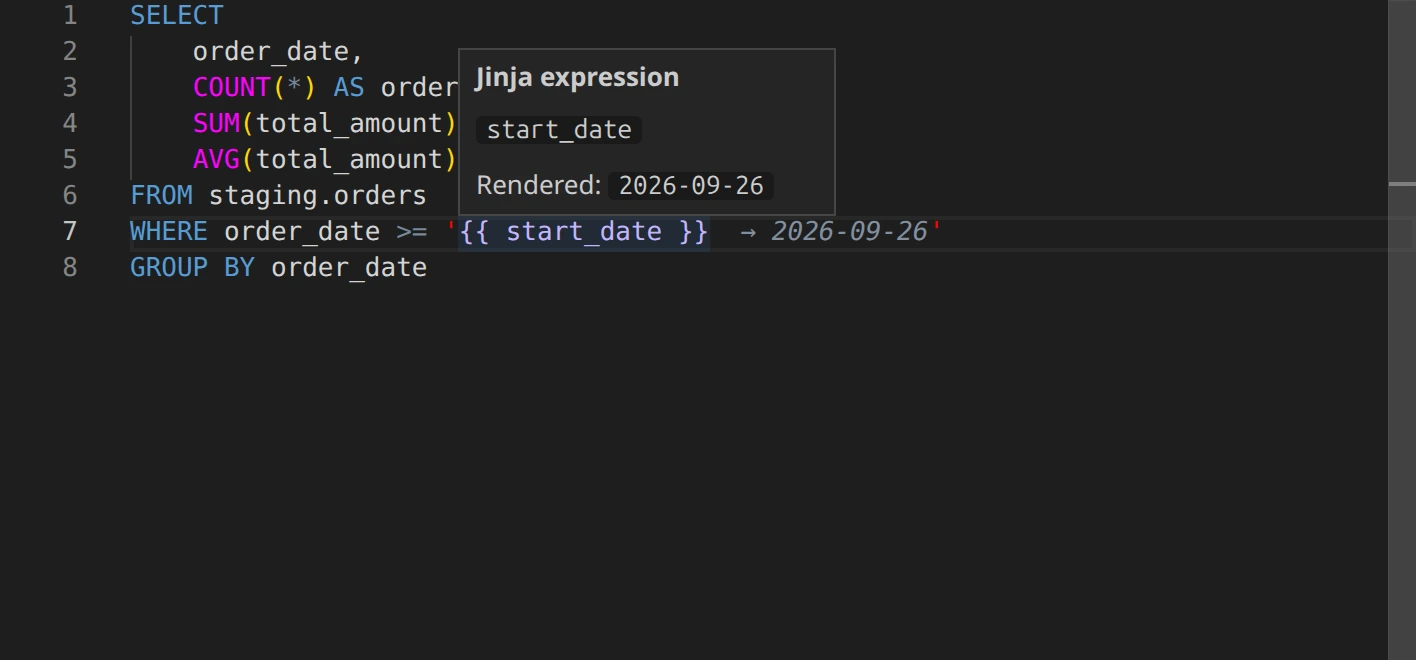
Insert a run value
Section titled “Insert a run value”- In the SQL editor, type the braces where the value belongs, for example
WHERE order_date >= '{{ }}'. - With the cursor inside the braces, open completion (Ctrl+Space) and choose a value.
- Hover the expression to see what it renders to. The rendered value also appears after the expression in the editor.
SELECT order_date, SUM(total_amount) AS revenueFROM staging.ordersWHERE order_date >= '{{ start_date }}'GROUP BY order_dateBuilt-in values:
| Value | Meaning |
|---|---|
start_date, end_date |
Run start and end date |
start_datetime, end_datetime |
Run start and end datetime |
start_timestamp, end_timestamp |
Run start and end timestamp |
execution_date |
Run execution date |
full_refresh |
Whether this is a full refresh |
pipeline |
Current pipeline name |
run_id |
Current run ID |
this |
Current asset name |
var |
Pipeline variables |
Values follow the window selected next to the environment in the top bar. A scheduled run renders the same template for its own window.
Share a value with pipeline variables
Section titled “Share a value with pipeline variables”- In the Explorer, open Pipeline settings, then Variables.
- Choose Add variable and enter a name, a type and a default value.
- Choose Save changes.
- Use the variable as
{{ var.name }}. Inside the braces, completion lists the pipeline’s variables with their types.
Pipeline variables are saved with the pipeline and can be referenced from SQL, YAML and Python assets.
Check the rendered query
Section titled “Check the rendered query”Open Render in the results panel to see the compiled SQL, the run window and the planned operations without executing anything. If a template cannot be rendered, Review run reports it as a blocker, so fix the expression before running.
Related
Section titled “Related”- The asset editor: the editor, results panel and workbench.
- Catch errors with type checking: checks also run on rendered templates.
- Python assets: read the run window and pipeline variables from Python.