
Runs & history
Open Run → Runs to inspect manual, scheduled, and API-triggered pipeline executions. Select a run to see its source, environment, timeline, and logs.
What a run records
Section titled “What a run records”Each run stores the pipeline, the environment it ran against, what triggered it, and a per-asset breakdown: status, start time, and duration for every asset in the run.
Read a run
Section titled “Read a run”Open a run to see its detail page:
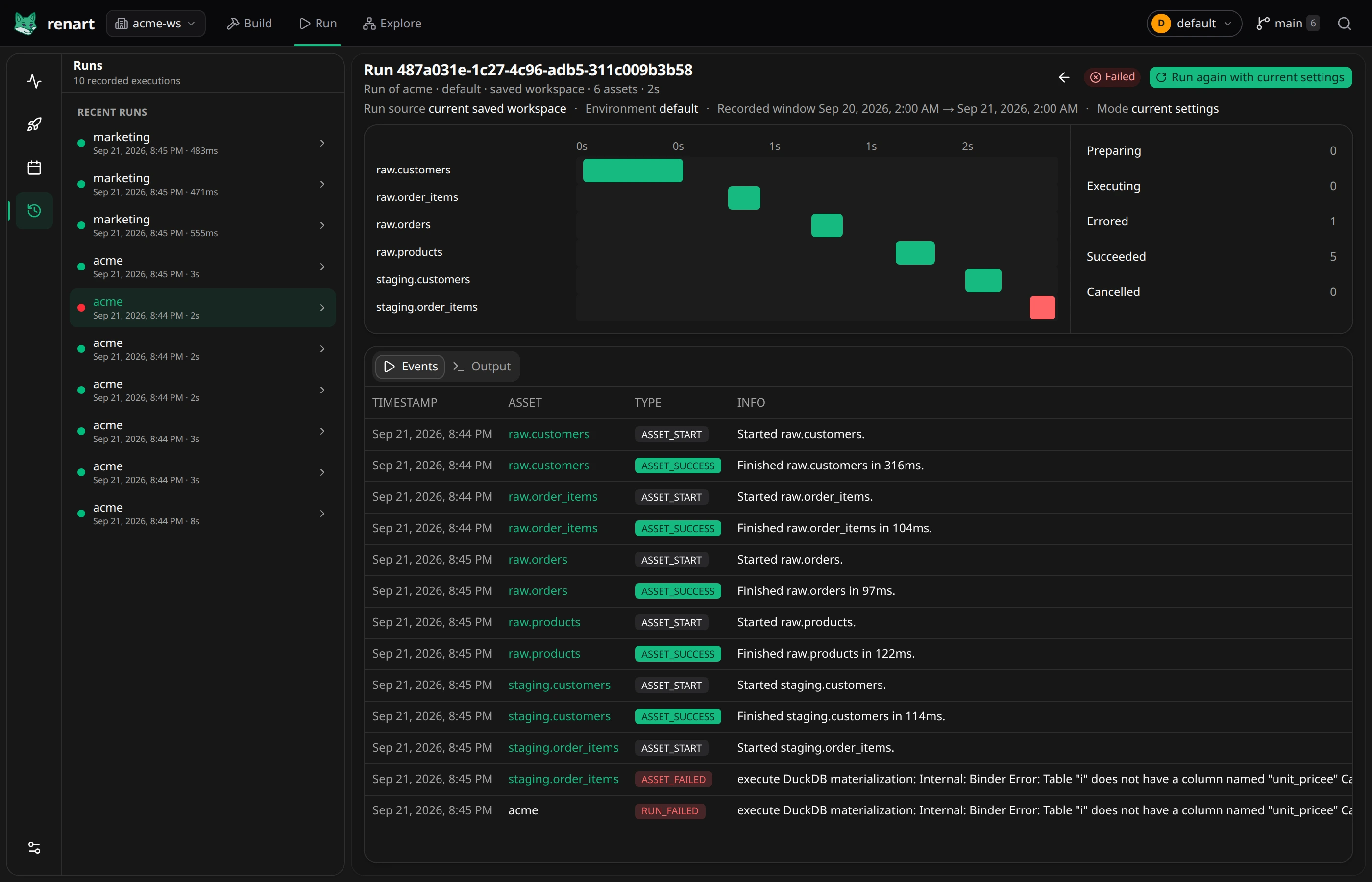
- The timeline at the top shows each asset as a bar — when it started, how long it took, and whether it succeeded or errored.
- The summary on the right counts assets by state (preparing, executing, errored, succeeded).
- The Events log below records each asset start/finish; on a failure, the error — for example the exact SQL binder error — is right there in the log. Output holds the combined terminal stream in execution order, including both standard output and standard error. It starts with the pipeline dependency check; a missing asset dependency stops the run before execution. Task output is timestamped and labeled with its asset name, so interleaved tool output remains attributable.
Stop an active run
Section titled “Stop an active run”Open its detail page and choose Abort run, then confirm. This works for background runs and foreground materializations still owned by this Renart process. Queued work is cancelled before execution; active work stops and finishes cleanup before the run becomes Cancelled. Completed events and output remain in history. Aborting does not roll back writes that already completed.
Re-run
Section titled “Re-run”When the original execution plan is retained, Re-execute exact plan reuses its source, environment, window, variables, and selected execution units after checking the configuration. The new run is manual; it does not advance a schedule’s watermark.
Otherwise the action is Run again with current settings. Its review explains which source and context remain available and which current settings will be used. Do not treat that fallback as an exact replay of the failed run.
Retention
Section titled “Retention”Renart keeps local history bounded during scheduler startup and daily housekeeping. By default it keeps run metadata for 180 days (and at least the newest 100 runs per pipeline), while full output logs use a shorter 30-day, 25-run floor. Raw materialization facts, schedule history, unreferenced deployments, and abandoned Renart temporary folders have separate limits.
Change these values under Project settings → General → Local history
retention. They are stored in .renart/project.yml as a reviewable project
policy. Active work, pending completion evidence, current or pinned
deployments, and compact freshness evidence are never removed merely because
of age.
Related
Section titled “Related”- Scheduling — where recurring runs come from.
- The pipeline canvas — freshness badges reflect the latest materializations.